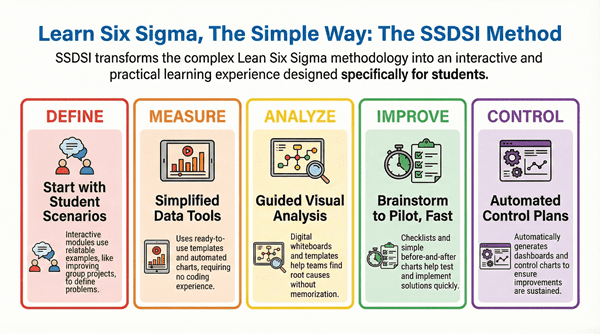
The DMAIC framework—Define, Measure, Analyze, Improve, Control—is the core method for fixing problems in Six Sigma. DMAIC can feel huge for new students learning about quality management. SSDSI (Six Sigma Development Solutions Inc.) makes this powerful method simple through training centered on what students need. DMAIC becomes easy to access, even without past experience.
SSDSI‘s Yellow Belt programs break down DMAIC into steps that are easy to manage. This design is perfect for college learners who must handle schoolwork and certification at the same time. SSDSI helps students define problems, measure performance, and find solutions with clear tools.
Table of contents
Top Ways SSDSI Simplifies DMAIC for Beginner Students
1. SSDSI Interactive Modules with Real Student Scenarios
SSDSI starts by making the DMAIC Define phase real. They use online, interactive parts that feature situations students can relate to, like making group project workflows better or speeding up campus event planning. This helps beginners avoid complex, abstract ideas.
SSDSI helps students jump right into tools like SIPOC diagrams (Suppliers, Inputs, Process, Outputs, Customers). They use simple drag-and-drop screens that need no special software. This approach removes fear because SSDSI lets students define problems fast. They build confidence before moving ahead.
Visual aids like moving flowcharts replace thick textbooks. Quizzes help students learn to find the voice of the customer (VOC). Knowing the VOC is a key part of Yellow Belt success. SSDSI‘s system tracks your progress. For example, it gives hints like, “Connect your late dorm study times to input suppliers, such as noisy roommates.” This turns fuzzy project ideas into clear, focused plans.

Public, Onsite, Virtual, and Online Six Sigma Certification Training!
- We are accredited by the IASSC.
- Live Public Training at 52 Sites.
- Live Virtual Training.
- Onsite Training (at your organization).
- Interactive Online (self-paced) training,
2. SSDSI Simplified Data Tools in Measure Phase
The Measure phase often makes new learners nervous because of statistics. SSDSI prepares students with ready-to-use Excel sheets and free add-ons for Google Sheets. These help track metrics like cycle time and defect rates.
SSDSI does not need coding. You upload a simple data set, maybe from a mock student internship. The dashboards then create charts like histograms and Pareto charts automatically.. SSDSI explains these using simple examples, such as tracking how long it takes to get pizza in your cafeteria line.
SSDSI teaches “minimum viable measurement.” This means you collect just enough data, such as 30 samples, for a good starting point. This avoids getting stuck in analysis paralysis. Built-in video tutorials that are less than five minutes long cover Gage R&R for checking measurement systems. Beginners leave the Measure phase with visual reports they can use on resumes. This helps with finding entry-level operations jobs.
Also Read: How SSDSI Helps Students with Six Sigma Yellow Belt Certification?
3. SSDSI Guided Visual Analysis for Root Causes
The Analyze phase can often make students stumble with tools for finding root causes, such as fishbone diagrams and the 5 Whys. SSDSI makes this easy through digital whiteboards where teams can share ideas together.
Pre-made templates ask, “Why did your study group miss deadlines?” This leads to causes put into categories like People, Process, or Materials. This way, you learn to think critically without having to memorize facts. Hypothesis testing uses simple words to explain tests like t-tests and ANOVA. SSDSI has simulators that do not use Python but still show you what $p$-values look like.
Real-time feedback from SSDSI mentors points out common mistakes. For instance, they show you the difference between correlation and causation. This is done through AI-assisted reviews. Students use regression analysis for scenarios like reducing waste in the campus cafeteria. They find insights like, “Peak lunch hours cause 60% of the delays.” This phase ends with regression trees, which help you tell a clear story with your data for presentations.
4. SSDSI Brainstorm-to-Pilot in Improve Phase
SSDSI changes the Improve phase from just thinking up ideas to taking real steps. It does this by using FMEA (Failure Modes and Effects Analysis) checklists that are set up for students. This helps students find and test the easiest improvements first.
Beginners create solutions like poka-yoke (error-proofing) for their study plans. Then, they run simple tests using before-and-after run charts. You do not need complex statistics here. The platform’s DOE (Design of Experiments) wizard suggests ways to test variables, such as “study session length versus retention rate,” in just a few clicks.
Cost-benefit charts rank ideas using numbers. This teaches you how to calculate ROI (Return on Investment) simply: . SSDSI gives you more than 50 templates that students have tested. These range from Lean kaizen events to full pilots, making sure changes stick. Graduates put changes to work in real group projects, smoothly moving from learning to doing.
Also Read: How SSDSI Guides Your Six Sigma Green Belt Certification Journey?
5. SSDSI Automated Control Plans for Sustainability
Keeping things fixed in the Control phase can fail without structure. SSDSI fixes this by using generators that make control plans automatically. These create dashboards for checking things constantly.
Students make SPC (Statistical Process Control) charts for metrics like “project turnaround time.” They set up alerts for problems via email. Tools for standardization create SOPs (Standard Operating Procedures) in Word or PDF format. These documents include plans for checks and what to do when things go wrong.
Visual boards, inspired by Kanban, track if the new process is being followed. The SSDSI certification simulator helps you get ready for exams with quick DMAIC reviews. Over time, students can use alumni dashboards to track their metrics even after they are certified. This helps Yellow Belt holders maintain processes during internships, which makes a great impression on employers.
Why SSDSI Stands Out for Students?
The SSDSI Yellow Belt program packs DMAIC into about 20 to 30 hours. This is perfect for busy schedules, blending self-paced videos, live question-and-answer sessions, and peer groups. Free introductory modules let you try the course first. SSDSI resources show that 95% of students finish the course.
Career aids include LinkedIn badges and project templates for your portfolio. SSDSI focuses on examples from the education world, like thesis timelines, which students really like. SSDSI lets you grow your Six Sigma knowledge without high costs. This gets you ready for the next step, which is your Green Belt.
Key Takeaways
- SSDSI simplifies DMAIC for beginners by offering interactive modules that relate to real student scenarios.
- In the Measure phase, SSDSI provides user-friendly data tools like Excel sheets, helping students track metrics without coding.
- SSDSI employs digital whiteboards and pre-made templates in the Analyze phase to guide critical thinking and root cause analysis.
- The Improve phase focuses on actionable steps, using FMEA checklists and cost-benefit charts for students to test improvements.
- SSDSI creates automated control plans in the Control phase, helping students maintain processes and gain valuable industry experience.
About Six Sigma Development Solutions, Inc.
Six Sigma Development Solutions, Inc. offers onsite, public, and virtual Lean Six Sigma certification training. We are an Accredited Training Organization by the IASSC (International Association of Six Sigma Certification). We offer Lean Six Sigma Green Belt, Black Belt, and Yellow Belt, as well as LEAN certifications.
Book a Call and Let us know how we can help meet your training needs.