You manage the quality of your product, right? You want your software application testing to be perfect before any user sees it. While automation testing tools certainly speed things up, a human touch remains essential. This is where manual testing plays a vital role in the larger software testing process. It ensures your application is not just functional, but also intuitive and user-friendly.
What exactly are manual testing tools? Simply put, these are the programs that help organize, document, and track the process of human-led software testing. They do not execute the test cases automatically; instead, they provide the framework, control, and reporting for the software test engineer and their team.
Are you looking for a practical guide to the best tools and their use cases? You came to the right place. We will walk you through the core concept of testing, how manual methods fit in, and which quality assurance tools will make your QA process highly efficient.
Table of contents
What is Software Testing?
Before we talk about manual testing, we must understand the core idea. Software testing is nothing but the process of evaluating a software product to check if it meets the specified requirements and to find any defects or bugs. This action leads to a stable and reliable final product for the customer.
What is the main goal? The goal is to ensure the quality assurance of the software. A good software test engineer performs different testing activities so as to identify errors, prevent defects, and ultimately deliver a seamless user experience.
Testing in Software Engineering
In software engineering, testing is an integral part of the development lifecycle. The software development team implements features, and the QA team verifies that those features work correctly.
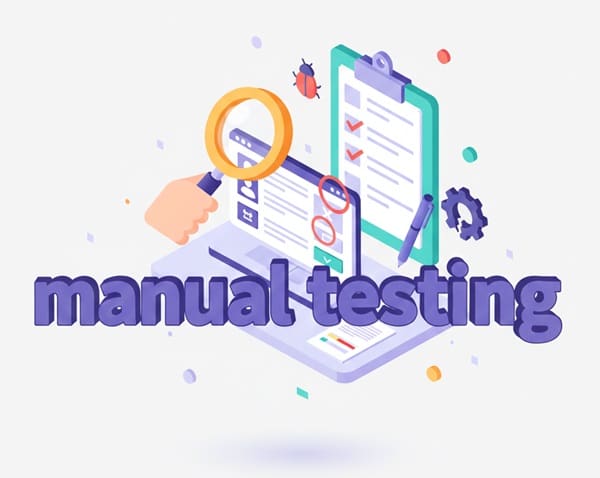
This process involves two main approaches:
- Manual Testing: A human tester executes test cases without relying on an automated script. This method is critical for judging aesthetics, usability, and for performing exploratory testing.
- Automation Testing: A tester writes code, often using specialized automation testing tools, to execute repetitive test cases automatically. Tools like testrigor or various automated testing tool options fall into this category.
For new features and areas requiring human judgment, manual testing is the way to go.

Public, Onsite, Virtual, and Online Six Sigma Certification Training!
- We are accredited by the IASSC.
- Live Public Training at 52 Sites.
- Live Virtual Training.
- Onsite Training (at your organization).
- Interactive Online (self-paced) training,
Essential Categories of Manual Testing Tools
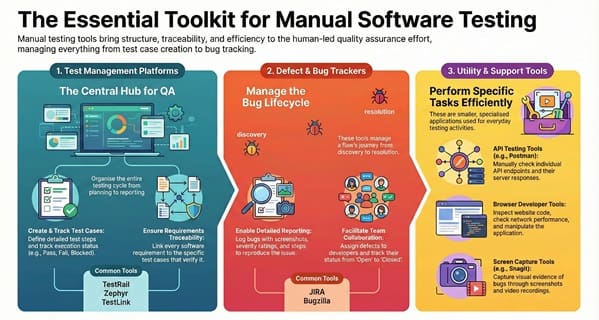
Manual testing tools do not perform the test itself; rather, they manage the entire operation. These are essentially test management tools and defect trackers that bring order and traceability to the human effort. You will find that these tools fall into a few key categories.
1. Test Management Tools
These are the most critical manual testing tools. They serve as the central hub for the entire QA effort. A test management tool facilitates the planning, creation, organization, execution, and reporting of test cases.
- Test Case Creation: They allow you to define detailed steps, expected results, and preconditions for each test.
- Test Execution Tracking: You can easily mark a test as ‘Pass,’ ‘Fail,’ or ‘Blocked’ and track the overall progress of your test cycles.
- Requirements Traceability: They ensure a clear link between the original software requirements and the test cases that verify them.
TestLink, TestRail, and Zephyr are common examples of these essential test tools.
2. Defect and Bug Tracking Tools
When a tester finds a flaw during manual testing, they must log and track it. Defect tracking tools are specialized qa testing software that manages the entire lifecycle of a bug—from its discovery to its final fix and retesting.
- Detailed Reporting: They allow the tester to log the issue with screenshots, steps to reproduce, severity, and priority.
- Workflow Management: They facilitate the assignment of the defect to a developer, tracking its status (e.g., ‘Open,’ ‘In Progress,’ ‘Fixed,’ ‘Closed’), and providing audit trails.
- Collaboration: They ensure clear communication between the software test engineer, the developer, and the project manager.
JIRA and Bugzilla are the most widely used platforms in this area.
3. Requirements Management Tools
Sometimes, the same platform that handles test management also deals with requirements. These tools help maintain and manage the software requirements document. This ensures that every feature you need to test is clearly defined.
- Change Control: They manage changes to the requirements throughout the project lifecycle.
- Scope Definition: They help define and maintain the scope for the testing efforts.
4. Utility and Support QA Tools
Beyond the core management systems, you will use many smaller utilities to perform specific manual testing tasks more efficiently.
- API Testing Tools: While full automation testing tools exist for APIs, manual testers use tools like Postman to manually check specific API endpoints and responses.
- Browser Developer Tools: These are built directly into web browsers and allow testers to inspect website code, check network performance, and manipulate the application environment.
- Screenshot and Video Capture Tools: A defect report is incomplete without visual evidence. Tools like Snagit or various operating system utilities are vital for capturing proof of the bug.
Also Read: Non-Destructive Testing (NDT)
Comparison of Popular Test Management Tools
Selecting the right test management tools is a key decision for any QA team. Each tool offers a unique feature set, depending on the scale and methodology of your software testing efforts.
The following chart outlines a comparison of some of the leading quality assurance tools available for managing manual testing.
| Basis for Comparison | JIRA (with Xray/Zephyr plugins) | TestRail | TestLink |
| Main Keyword Focus | Test Management Tools & Defect Tracking | Test Management Tools | Test Management Tools (Open Source) |
| Primary Purpose | Comprehensive project and issue tracking, acting as a central hub for development and testing. | Dedicated platform for test case design, execution, and reporting. | Web-based platform for test plan and test case management. |
| Integration | Deeply integrated with the entire Atlassian suite; integrates with virtually all other qa tools. | Offers robust API for integration with popular issue trackers (JIRA, Bugzilla) and automation testing tools. | Can integrate with popular defect trackers like JIRA and Bugzilla. |
| Ease of Use | Moderate to High. Requires configuration, especially with add-ons. | High. TestRail‘s clean interface and workflow are designed specifically for testers. | Moderate. Requires some technical setup as it is open-source. |
| Cost | Licensing cost for JIRA plus cost for testing add-ons. | Subscription-based (SaaS). | Free and Open Source. |
| Best Suited For | Agile teams that want to keep all development, requirements, and testing artifacts in one system. | Teams that require powerful, dedicated test management features and detailed reporting. | Smaller teams or budget-conscious projects needing basic but organized test case storage. |
Test Management Tools for Software Testing
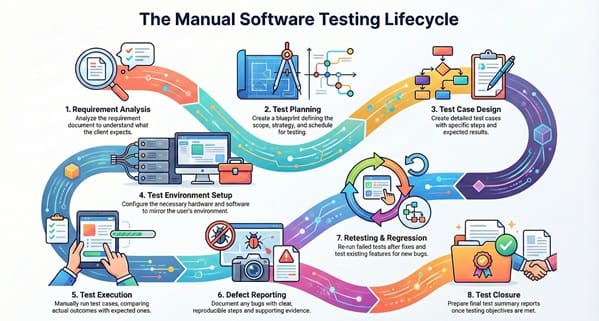
The tools above are powerful because they allow the software test engineer to work in a structured manner. By centralizing the test cases, the team maintains consistency and ensures full test coverage. This is crucial for quality assurance.
The Manual Testing Process: Step-by-Step
Understanding the process helps you see exactly where these manual testing tools fit in. The entire software testing process is systematic, guaranteeing that the application is thoroughly vetted.
1. Requirement Analysis
First, the team analyzes the functional and non-functional requirements of the software. A software test engineer must understand exactly what the client expects.
- Action: Analyze the requirement document.
- Tool Use: Use the requirements management tools to view, track, and clarify any ambiguities.
2. Test Planning
The next step is preparing the test plan. This document essentially acts as a blueprint for the entire testing effort.
- Action: Define the scope, objective, strategy, resources, and schedule for the testing.
- Tool Use: A test management tool helps you create and store the test plan document and link it to the project timeline.
3. Test Case Design
Based on the requirements, the QA team designs detailed test cases. Each test case includes specific steps, test data, and the expected result.
- Action: Create a set of test cases to verify all features.
- Tool Use: Test management tools like TestRail or JIRA are used to write, organize, and categorize these detailed test cases.
4. Test Environment Setup
Before execution, you must set up the environment. This means configuring the necessary hardware, software, and network settings to mirror the user’s environment.
- Action: Install the application and necessary configurations.
- Tool Use: Inventory and configuration qa tools are sometimes used to manage the specifics of the environment.
5. Test Execution
This is the core of manual testing. The human tester executes the test cases one by one, manually interacting with the application as a real user would.
- Action: Follow the steps in the test case and compare the actual outcome with the expected outcome.
- Tool Use: The test management tool is used to record the result of each test case (Pass or Fail) in real time.
6. Defect Reporting
When the actual result does not match the expected result, a bug is found. The tester logs this as a defect.
- Action: Document the bug with clear steps to reproduce and supporting evidence.
- Tool Use: JIRA, Bugzilla, or other defect tracking tools are used to log the defect, assign a severity, and assign it to a developer for fixing.
7. Retesting and Regression Testing
After the developer fixes the defect, the tester performs retesting on that specific fix. Regression testing then follows. Regression testing involves re-running a set of existing test cases to ensure the code changes did not negatively impact previously working functionalities.
- Action: Execute the failed test case again, then run the relevant regression test suites.
- Tool Use: Test management tools help organize and execute the dedicated regression testing test suite efficiently.
8. Test Closure
Finally, once testing objectives are met and the application passes the release criteria, the testing cycle is officially closed.
- Action: Prepare final test summary reports and metrics.
- Tool Use: The test management tool generates the final reports and traceability matrices.
Also Read: Hypothesis Testing Cheat Sheet
Frequently Asked Questions about Manual Testing Tools
You likely have several questions about combining human effort with testing software. We tackle the most common ones here.
What is manual testing in simple terms?
Manual testing can be understood as the act of a human validating software quality by hand. A human tester interacts with the application like an end-user, checking every function, visual element, and flow. This action allows them to find errors and assess the overall user experience. This is crucial when automated scripts cannot replicate human intuition or subjective judgment.
How do manual testing tools differ from automation testing tools?
The difference lies in the execution method. Automation testing tools like Selenium or testrigor execute a predefined script automatically, reducing time for repetitive tasks. In contrast, manual testing tools are essentially powerful organization and collaboration qa tools. They do not run the test cases for you, but they manage the entire process—designing, tracking, and reporting on the human-executed tests. They serve to streamline the human effort.
Is manual testing still relevant with the rise of AI in test automation?
Yes, manual testing remains vital. The rise of AI in test automation and AI test automation tools certainly helps with functional and performance checks. However, a human software test engineer performs tasks that AI testing tool options cannot, such as:
- Exploratory Testing: Creatively testing outside of defined cases.
- Usability Testing: Judging how intuitive and pleasant the application is to use.
- Ad-Hoc Testing: Unplanned, quick checks often based on intuition.
Manual testing is the foundation that provides the human feedback loop.
Key Takeaways
The truth is, high-quality software requires both human and technical excellence. Your team needs to embrace a combined strategy.
- Manual Testing is Indispensable: Never forget that manual testing captures the authentic end-user experience. It plays a vital role in checking aesthetics and usability—areas where no automated software testing tool can replace human judgment.
- Organization is Power: The true power of manual testing tools lies in their ability to organize your effort. Utilizing a solid test management tool like TestRail or a Jira-based solution ensures that your thousands of test cases are traceable, reusable, and clearly linked back to your requirements.
- Defect Tracking Streamlines Fixing: The efficient management of bugs using qa testing software tools like JIRA dramatically speeds up the development-test-fix cycle. This ensures your quality assurance process is lean and effective.
Final Words
You now clearly understand that manual testing remains an essential activity in the entire software testing process. While advanced automation testing tools handle repetitive tasks, the human insight provided by a software test engineer is irreplaceable for checking usability and user experience. To organize this crucial human effort, you must utilize effective manual testing tools—primarily test management tools and defect trackers like JIRA and TestRail.
These qa testing software options bring necessary structure, traceability, and organization to your test cases and execution. By equipping your team with the right test tools, you ensure that your software application testing is systematic, well-documented, and ultimately leads to delivering the highest quality assurance to your customers.