
Simple linear regression is a statistical method that quantifies the relationship between one independent variable (X) and one dependent variable (Y) by fitting a straight line through a set of data points.
In Six Sigma, simple linear regression is used during the Analyze phase of DMAIC to determine whether a process input (X) has a statistically significant, measurable effect on a process output (Y) — and to predict what that output will be at different input levels.
Meaning of Simple Linear Regression
Simple linear regression is a statistical technique that models the linear relationship between two continuous variables. It produces an equation of the form Y = b₀ + b₁X, where b₀ is the y-intercept (the predicted value of Y when X equals zero) and b₁ is the slope (the average change in Y for each one-unit increase in X).
The model is built using the least squares method, which finds the line that minimizes the total squared distance between the observed data points and the predicted values on the line.
Key Takeaways
- Simple linear regression models the relationship between one independent variable (X) and one dependent variable (Y) using the equation Y = b₀ + b₁X + ε.
- The slope (b₁) represents the average change in Y for each one-unit increase in X. The y-intercept (b₀) is the predicted value of Y when X equals zero.
- The least squares method is used to calculate the slope and intercept by minimizing the sum of squared residuals (the differences between observed and predicted Y values).
- R-squared (coefficient of determination) measures what percentage of the variation in Y is explained by X. It ranges from 0 to 1, with values closer to 1 indicating better model fit.
- The p-value for the slope coefficient tests whether the relationship between X and Y is statistically significant. A p-value below 0.05 is the conventional threshold for significance.
- In Six Sigma, simple linear regression is applied in the Analyze phase of DMAIC to identify which process inputs (Xs) significantly affect the output (Y) and to quantify that relationship.
- Five assumptions must be verified before trusting a regression model: linearity, independence, homoscedasticity, normality of residuals, and no significant outliers.
Table of contents
- Meaning of Simple Linear Regression
- What Is Simple Linear Regression?
- The Simple Linear Regression Equation
- Why Simple Linear Regression Matters in Six Sigma
- The Five Assumptions of Simple Linear Regression
- How to Calculate Simple Linear Regression: Step-by-Step
- Simple Linear Regression vs. Multiple Linear Regression
- Frequently Asked Questions: Simple Linear Regression
What Is Simple Linear Regression?
Simple linear regression is a statistical method for modeling the relationship between two continuous variables. The word “simple” means the model uses exactly one independent variable to predict one dependent variable. When two or more independent variables are used, the method becomes multiple linear regression.
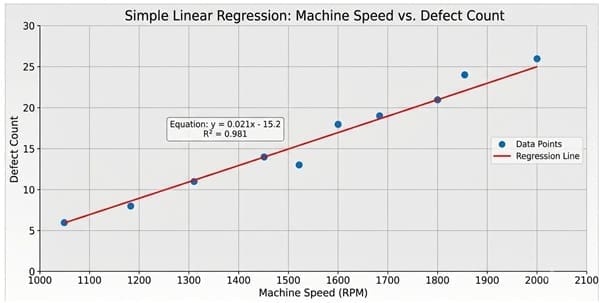
The two variables in a simple linear regression model are:
- The independent variable (X) — also called the predictor, input variable, or explanatory variable. This is the variable the analyst controls or measures as a potential cause.
- The dependent variable (Y) — also called the response variable or output variable. This is the outcome the analyst is trying to predict or explain.
The goal of simple linear regression is to find the straight line that best represents the relationship between X and Y across the observed data. That line is described by the regression equation.

Public, Onsite, Virtual, and Online Six Sigma Certification Training!
- We are accredited by the IASSC.
- Live Public Training at 52 Sites.
- Live Virtual Training.
- Onsite Training (at your organization).
- Interactive Online (self-paced) training,
The Simple Linear Regression Equation
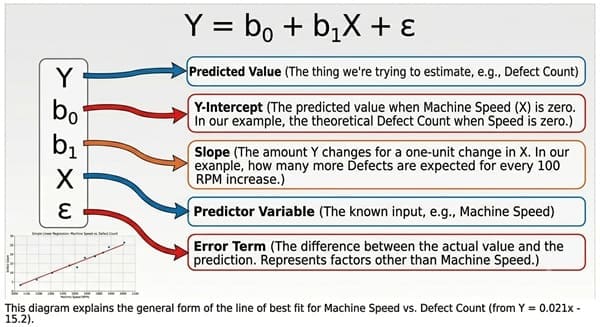
The equation for a simple linear regression model is:
Y = b₀ + b₁X + ε
Where:
- Y is the predicted value of the dependent variable
- b₀ is the y-intercept — the predicted value of Y when X equals zero
- b₁ is the slope — the average change in Y for each one-unit increase in X
- ε (epsilon) is the error term — the difference between the actual observed Y value and the predicted Y value from the equation
The slope (b₁) is the most important parameter for interpreting a simple linear regression. If the slope is positive, Y increases as X increases. If the slope is negative, Y decreases as X increases. However, if the slope is zero (or not statistically different from zero), X has no meaningful linear relationship with Y.
Why Simple Linear Regression Matters in Six Sigma
In Six Sigma, the central question in any DMAIC project is: which inputs (Xs) are driving variation in the output (Y)?
Simple linear regression gives Six Sigma practitioners a quantitative, statistically defensible answer to that question for relationships between two continuous variables. It moves the team beyond correlation (which tells you whether a relationship exists and in what direction) to a predictive equation (which tells you exactly how much Y changes for a given change in X).
Simple linear regression is used in the Analyze phase of DMAIC for the following purposes:
- Confirming that a suspected X variable has a statistically significant relationship with Y.
- Quantifying the magnitude of that relationship through the slope coefficient.
- Building a prediction equation that allows the team to estimate Y at different X levels — useful for setting process targets in the Improve phase.
- Identifying unexplained variation (residuals) that may point to additional Xs not yet in the model.
For example, a Six Sigma team investigating high defect rates in a manufacturing process might use simple linear regression to test whether machine operating temperature (X) significantly predicts the defect rate (Y). If the regression confirms a significant relationship and produces a useful prediction equation, the team has a data-driven basis for targeting a specific temperature range in the Improve phase.
The Five Assumptions of Simple Linear Regression

A simple linear regression model produces reliable results only when the underlying data meets five key assumptions. Violating these assumptions does not make the math fail — it makes the results misleading. Checking assumptions is not optional; it is part of the analysis.
The five assumptions of simple linear regression are:
1. Linearity
The relationship between X and Y must be approximately linear. The best way to verify this is to create a scatter plot of X vs. Y before building the model. If the data shows a curved or nonlinear pattern, a linear model will not fit well, and the predictions will be systematically biased. In that case, consider a transformation of X or Y, or a polynomial regression model.
2. Independence of Observations
Each data point must be independent of the others. One observation should not influence or be caused by another. In practice, this means the data should not be collected in a sequence where earlier values affect later values (time-series autocorrelation). In Six Sigma projects, independence is typically ensured by random sampling or by ensuring data is drawn from independent process runs.
3. Homoscedasticity (Constant Variance of Residuals)
The variance of the residuals (the vertical distances between data points and the regression line) should be roughly constant at all levels of X. When residuals fan out as X increases, the assumption of homoscedasticity is violated. This condition is called heteroscedasticity. A residual plot (residuals on the Y-axis, fitted values on the X-axis) is the standard diagnostic tool for checking this assumption.
4. Normality of Residuals
The residuals should be approximately normally distributed. This assumption enables the validity of the p-values and confidence intervals produced by the regression. A normal probability plot (also called a normal Q-Q plot) of the residuals is the standard check. With larger sample sizes (30 or more observations), the Central Limit Theorem reduces the sensitivity of the model to this assumption.
5. No Significant Outliers or Influential Points
Individual data points that are far from the regression line (outliers) or that have high leverage (unusual X values that pull the line toward them) can distort the slope and intercept significantly. Residual plots, leverage statistics, and Cook’s Distance are diagnostic tools used to identify and investigate these points.
Violating any of these assumptions requires either transforming the data, collecting additional data, or changing the modeling approach before the regression results can be trusted.
Also Read: Shingo Model
How to Calculate Simple Linear Regression: Step-by-Step
The following steps describe how to build a simple linear regression model by hand and how to verify it using statistical software. Understanding the manual calculation builds intuition for what the software is doing.
Step 1: Define X and Y
Identify which variable is the independent variable (X) and which is the dependent variable (Y). In a Six Sigma project, X is typically the process input or suspected cause, and Y is the process output or quality characteristic.
Example used throughout this section: A Six Sigma Green Belt is investigating whether machine speed (X, measured in revolutions per minute) predicts surface defect count (Y, defects per unit). Ten production runs are recorded.
| Run | Machine Speed (X) | Defect Count (Y) |
| 1 | 100 | 4 |
| 2 | 120 | 5 |
| 3 | 140 | 7 |
| 4 | 160 | 8 |
| 5 | 180 | 10 |
| 6 | 200 | 11 |
| 7 | 220 | 13 |
| 8 | 240 | 14 |
| 9 | 260 | 16 |
| 10 | 280 | 17 |
Step 2: Create a Scatter Plot
Before calculating anything, plot X on the horizontal axis and Y on the vertical axis. If the relationship is clearly linear and no extreme outliers are visible, proceed with simple linear regression. If the plot shows a curve, revisit the modeling approach.
In this example, the scatter plot shows a clear upward linear trend: as machine speed increases, defect count increases.
Step 3: Calculate the Slope (b₁)
The slope is calculated using the least squares formula:
b₁ = [n(ΣXY) − (ΣX)(ΣY)] / [n(ΣX²) − (ΣX)²]
Where:
- n = number of data points (10 in this example)
- ΣXY = sum of each X multiplied by its paired Y
- ΣX = sum of all X values
- ΣY = sum of all Y values
- ΣX² = sum of each X value squared
For this example:
- ΣX = 1,900
- ΣY = 105
- ΣXY = 22,900
- ΣX² = 406,000
- n = 10
b₁ = [10(22,900) − (1,900)(105)] / [10(406,000) − (1,900)²] b₁ = [229,000 − 199,500] / [4,060,000 − 3,610,000] b₁ = 29,500 / 450,000 b₁ ≈ 0.0656
Interpretation: For each 1 RPM increase in machine speed, the defect count increases by approximately 0.066 defects per unit.
Step 4: Calculate the Y-Intercept (b₀)
The y-intercept is calculated using:
b₀ = (ΣY − b₁ΣX) / n
b₀ = (105 − 0.0656 × 1,900) / 10 b₀ = (105 − 124.6) / 10 b₀ = −19.6 / 10 b₀ ≈ −1.96
Step 5: Write the Regression Equation
Defect Count = −1.96 + 0.0656 × Machine Speed
This equation allows the team to predict the expected defect count at any machine speed within the range of the data.
Prediction example: At 150 RPM, predicted defect count = −1.96 + 0.0656 × 150 = −1.96 + 9.84 = 7.88 defects per unit.
Step 6: Assess the Model Fit Using R-Squared
R-squared (written as R² or “R-squared”) is the coefficient of determination. It measures the proportion of the total variation in Y that is explained by the regression model.
R-squared ranges from 0 to 1:
- R² = 0 means the model explains none of the variation in Y. The X variable provides no predictive value.
- R² = 1 means the model explains 100% of the variation in Y. Every data point falls exactly on the regression line (in practice, this never occurs with real data).
- R² = 0.85 means 85% of the variation in Y is explained by X. The remaining 15% is unexplained by the model.
In this example, the R-squared value is approximately 0.998, meaning machine speed explains approximately 99.8% of the variation in defect count. This is an extremely strong fit, which is expected given the clean, simulated data. In real Six Sigma projects, R-squared values of 0.60 to 0.85 are common for single-variable models and represent useful predictive relationships.
Important caution: A high R-squared does not mean the model is correct or that the relationship is causal. It means the linear model fits the observed data well. Always check residual plots and verify assumptions before relying on R-squared alone.
Step 7: Check the p-Value for the Slope
The p-value for the slope coefficient (b₁) tests the null hypothesis that the slope equals zero — meaning X has no linear relationship with Y. A small p-value provides statistical evidence that the slope is different from zero, which means the relationship between X and Y is statistically significant.
The conventional significance threshold in Six Sigma projects is α = 0.05:
- p-value < 0.05: Reject the null hypothesis. The relationship between X and Y is statistically significant.
- p-value ≥ 0.05: Fail to reject the null hypothesis. There is insufficient evidence of a significant linear relationship.
In this example, with 10 data points and a very strong linear relationship, the p-value for the slope would be well below 0.05, confirming that machine speed is a statistically significant predictor of defect count.
Step 8: Examine the Residual Plots
Residuals are the differences between each observed Y value and the Y value predicted by the regression equation. Examining residuals validates the assumptions of the model.

The standard residual plots to review are:
- Residuals vs. Fitted Values plot — Checks for homoscedasticity and linearity. Residuals should appear randomly scattered around zero with no pattern. A funnel shape indicates heteroscedasticity. A curved pattern indicates the relationship is not actually linear.
- Normal Probability Plot of Residuals — Checks the normality assumption. Residuals should fall approximately along a straight diagonal line.
- Residuals vs. Order plot — Checks for autocorrelation when data is collected in a time sequence. Residuals should show no trend over time.
If any residual plot reveals a pattern or violation, the model assumptions must be addressed before the regression results are used for decision-making.
How to Run Simple Linear Regression in Minitab
Minitab is the most widely used statistical software in Six Sigma training and practice. The following steps describe how to run a simple linear regression in Minitab.
The following steps outline the Minitab process for simple linear regression:
- Enter your X data in one column and your Y data in an adjacent column with clear column headers.
- Select Stat from the top menu.
- Select Regression, then select Regression, then select Fit Regression Model.
- Move your Y variable into the “Responses” box.
- Move your X variable into the “Continuous predictors” box.
- Click Graphs and select “Four in one” under Residual Plots. This produces the four standard residual diagnostic plots in a single view.
- Click OK to run the analysis.
Minitab produces a session window output that includes the regression equation, the R-squared value, the p-value for the slope, the standard error of the regression, and the full ANOVA table. Examine the residual plots first before interpreting the numerical output.
Also Read: Six Sigma Tools for The Automobile Industry
How to Run Simple Linear Regression in Excel
Excel is commonly available and sufficient for basic simple linear regression analysis.
The following steps outline the Excel process for simple linear regression:
- Enter your X data in one column and Y data in an adjacent column.
- Select the Data tab from the ribbon.
- Click Data Analysis (if not visible, go to File > Options > Add-ins > Analysis ToolPak to enable it).
- Select Regression from the list and click OK.
- Set the Input Y Range to your Y data column (including the header).
- Set the Input X Range to your X data column (including the header).
- Check the “Labels” box if your ranges include column headers.
- Check “Residuals” and “Residual Plots” to produce diagnostic outputs.
- Click OK.
Excel produces a summary output table including R-squared, the slope and intercept coefficients, their p-values, and standard errors. Excel also produces a residual plot, though it is less informative than Minitab’s four-in-one residual output. For robust residual analysis, Minitab or dedicated statistical software is preferred.
Interpreting Simple Linear Regression Output: What Each Number Means
A simple linear regression output contains several statistics. The following table describes what each one means and how to use it in a Six Sigma context.
| Statistic | What It Measures | How to Interpret It |
| Slope (b₁) | Average change in Y per one-unit increase in X | Sign shows direction (positive/negative); magnitude shows strength of effect |
| Y-Intercept (b₀) | Predicted Y when X = 0 | Useful for building the prediction equation; may not be practically meaningful if X = 0 is outside the data range |
| R-squared (R²) | Proportion of Y variation explained by the model | Higher is better; 1.0 is perfect fit; 0 means no explanatory value |
| p-value (slope) | Probability of observing this slope if the true slope is zero | Below 0.05: slope is statistically significant. Above 0.05: insufficient evidence of a relationship |
| Standard Error of the Regression (S) | Average distance between observed Y values and the regression line, in Y units | Smaller is better; measures prediction accuracy in the same units as Y |
| Residuals | Difference between observed Y and predicted Y for each data point | Should be randomly distributed with no pattern; patterns indicate assumption violations |
Simple Linear Regression vs. Multiple Linear Regression
Simple linear regression uses one independent variable (X) to predict one dependent variable (Y).
Multiple linear regression uses two or more independent variables (X₁, X₂, X₃…) to predict one dependent variable (Y). The equation extends to:
Y = b₀ + b₁X₁ + b₂X₂ + … + bₙXₙ + ε
In Six Sigma DMAIC projects, the progression is typically:
- Use simple linear regression to test each potential X variable individually against Y during the Analyze phase.
- For Xs that are individually significant, build a multiple linear regression model to assess their combined effect on Y and control for interactions.
- Use the final regression model to inform process targets in the Improve phase.
Simple linear regression is the foundation. Multiple linear regression builds on it. Green Belt practitioners are expected to be proficient in simple linear regression. Black Belt practitioners are expected to design and interpret multiple linear regression models.
| Feature | Simple Linear Regression | Multiple Linear Regression |
| Number of X variables | One | Two or more |
| Equation form | Y = b₀ + b₁X | Y = b₀ + b₁X₁ + b₂X₂ + … |
| Fit statistic | R-squared | Adjusted R-squared |
| Primary Six Sigma use | Initial variable screening in Analyze phase | Building prediction models using confirmed significant Xs |
| Belt level | Green Belt | Black Belt |
Also Read: Multi-Criteria Decision Analysis (MCDA)
Common Mistakes in Simple Linear Regression and How to Avoid Them
The following mistakes appear frequently in Six Sigma projects when simple linear regression is applied without sufficient care.
Mistake 1: Confusing correlation with causation. A statistically significant regression does not mean X causes Y. It means there is a measurable linear association between X and Y in the data. Establishing causation requires process knowledge, designed experiments, or both. Regression is evidence of a relationship, not proof of a cause.
Mistake 2: Extrapolating beyond the data range. The regression equation is valid only within the range of X values used to build the model. Using it to predict Y for X values far outside the observed data range can produce unreliable estimates. This is called extrapolation and should be avoided unless there is strong theoretical reason to believe the linear relationship holds beyond the observed range.
Mistake 3: Skipping residual plot inspection. R-squared alone does not validate a model. A dataset can produce a high R-squared and still violate assumptions in ways that make the model unreliable. Always examine residual plots before trusting regression output.
Mistake 4: Ignoring outliers. A single outlier can shift the slope significantly, especially in small datasets. Identify and investigate any data points with large residuals or high leverage before finalizing the model. Do not delete outliers without understanding why they occurred.
Mistake 5: Using regression for non-continuous data. Simple linear regression requires both X and Y to be continuous (measurable on a scale). If Y is binary (pass/fail, yes/no) or categorical, logistic regression or a different method is appropriate.
Simple Linear Regression in the DMAIC Framework
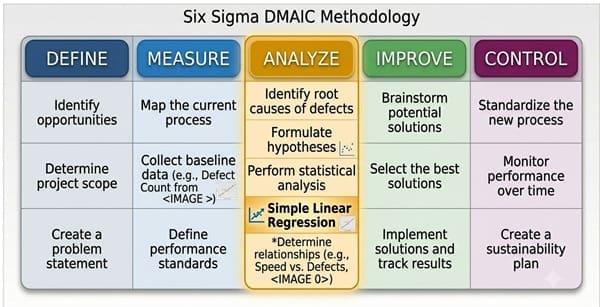
Simple linear regression connects specifically to the Analyze phase of DMAIC, but its output informs the Improve and Control phases as well.
| DMAIC Phase | How Simple Linear Regression Applies |
| Define | Not typically used; phase focuses on problem scoping and project charter |
| Measure | Collect the paired X-Y data needed for regression; verify measurement system capability (MSA) for both X and Y variables |
| Analyze | Build the regression model; test slope significance; assess R-squared; examine residual plots; confirm which Xs are statistically significant predictors of Y |
| Improve | Use the regression equation to identify the X value (process setting) that produces the desired Y (quality target); validate predicted improvement with pilot data |
| Control | Monitor the significant X variable with a control chart; use the regression equation as a reference to predict what Y will be if X drifts |
The Analyze phase output from simple linear regression directly feeds the Improve phase. If the regression shows that machine speed significantly predicts defect count, the improvement team can calculate the machine speed setting that is predicted to produce an acceptable defect rate and implement that as the new process standard.
Six Sigma Training for Simple Linear Regression and Statistical Analysis
Simple linear regression is taught as part of the Green Belt and Black Belt curricula in Six Sigma. Understanding how to build the model, interpret the output, and connect findings to DMAIC project decisions is a core Green Belt competency.
At Six Sigma Development Solutions Inc, our training covers simple linear regression in the context of real DMAIC projects — not as an isolated statistics lesson. Practitioners learn which questions regression answers, how to run the analysis in Minitab, how to interpret every number in the output, and how to translate regression findings into process improvement decisions.
We offer Six Sigma training in three formats:
- Onsite training — Delivered at your organization, using your processes and data as project context. Best for teams running live DMAIC projects.
- Live virtual training — Instructor-led sessions delivered online, with real-time interaction, statistical software walkthroughs, and team exercises.
- Online training — Self-paced certification programs that cover simple linear regression and the full DMAIC statistical toolkit. Available at Green Belt and Black Belt levels.
Simple linear regression appears on both the IASSC Green Belt and Black Belt certification exams. Our training programs include exam preparation that covers all testable statistical concepts, including regression analysis.
Frequently Asked Questions: Simple Linear Regression
Q: What is simple linear regression in simple terms?
A: Simple linear regression is a statistical method that finds the straight line that best fits a set of data points showing the relationship between two variables. It produces an equation (Y = b₀ + b₁X) that allows you to predict the value of one variable (Y) based on a known value of another variable (X). The slope (b₁) tells you how much Y changes for each one-unit increase in X.
Q: What is the difference between simple linear regression and correlation?
A: Correlation measures the strength and direction of the linear relationship between two variables, expressed as a value between −1 and +1 (the Pearson correlation coefficient, r). Simple linear regression goes further: it produces a predictive equation that quantifies exactly how much Y changes for a given change in X, and it allows you to predict Y values for specific X values. In Six Sigma, correlation is typically the first step; regression follows to build the predictive model.
Q: What does R-squared mean in a regression analysis?
A: R-squared (the coefficient of determination) measures the proportion of the total variation in Y that is explained by the regression model. An R-squared of 0.75 means 75% of the variation in Y is explained by X; the remaining 25% is unexplained. R-squared ranges from 0 (no explanatory value) to 1 (perfect fit). In Six Sigma process improvement projects, R-squared values between 0.60 and 0.85 often represent useful models. Values above 0.85 indicate a strong linear relationship between X and Y.
Q: How do I know if a simple linear regression result is statistically significant?
A: Statistical significance is assessed using the p-value for the slope coefficient (b₁). If the p-value is less than 0.05 (the standard alpha level used in most Six Sigma projects), the slope is statistically significant, meaning there is sufficient evidence that X has a real linear relationship with Y and that the relationship is not simply due to random chance. If the p-value is 0.05 or above, the evidence is insufficient to conclude a significant relationship.
Final Words
Simple linear regression is not just a statistics concept. In the context of DMAIC, it is a decision-making tool.
It tells a Six Sigma team whether a suspected process input actually predicts the output, how strongly, and in what direction. It produces a predictive equation that translates directly into process targets. And it surfaces unexplained variation — through residuals — that points the team toward additional Xs worth investigating.
Mastering simple linear regression means understanding not just how to calculate the slope and intercept, but also how to verify the five assumptions, how to interpret R-squared and p-values without oversimplifying them, and how to connect regression findings to improve and control phase decisions.
That level of applied statistical understanding is what Six Sigma Green Belt and Black Belt training is designed to build.
Ready to learn simple linear regression in the context of a real DMAIC project?
Six Sigma Development Solutions offers Green Belt and Black Belt training through onsite, live virtual, and online formats. Explore our Six Sigma training programs or contact our team to find the right program for your goals.
About Six Sigma Development Solutions, Inc.
Six Sigma Development Solutions, Inc. offers onsite, public, and virtual Lean Six Sigma certification training. We are an Accredited Training Organization by the IASSC (International Association of Six Sigma Certification). We offer Lean Six Sigma Green Belt, Black Belt, and Yellow Belt, as well as LEAN certifications.
Book a Call and Let us know how we can help meet your training needs.


